AI & research2026EN
NOVA
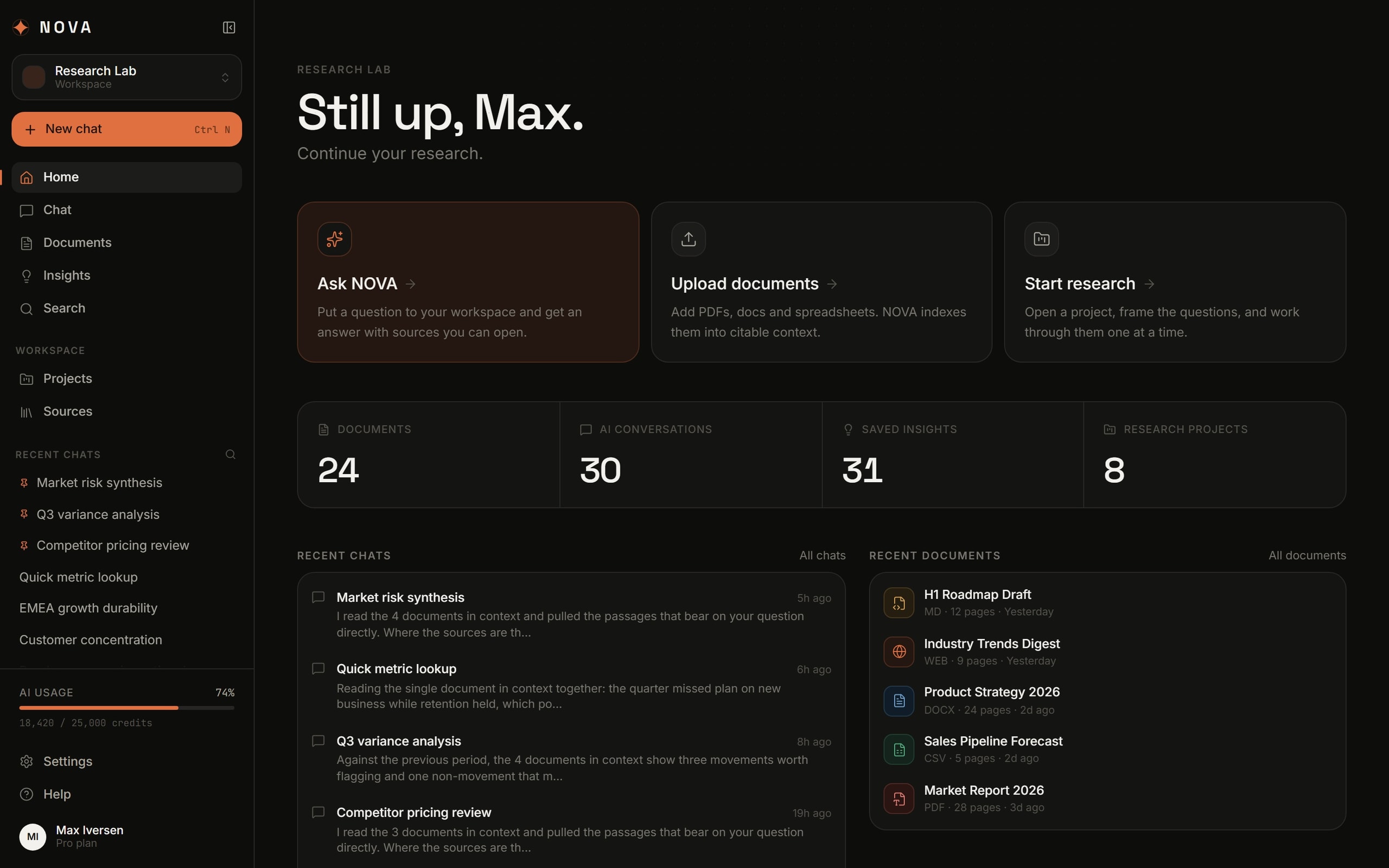
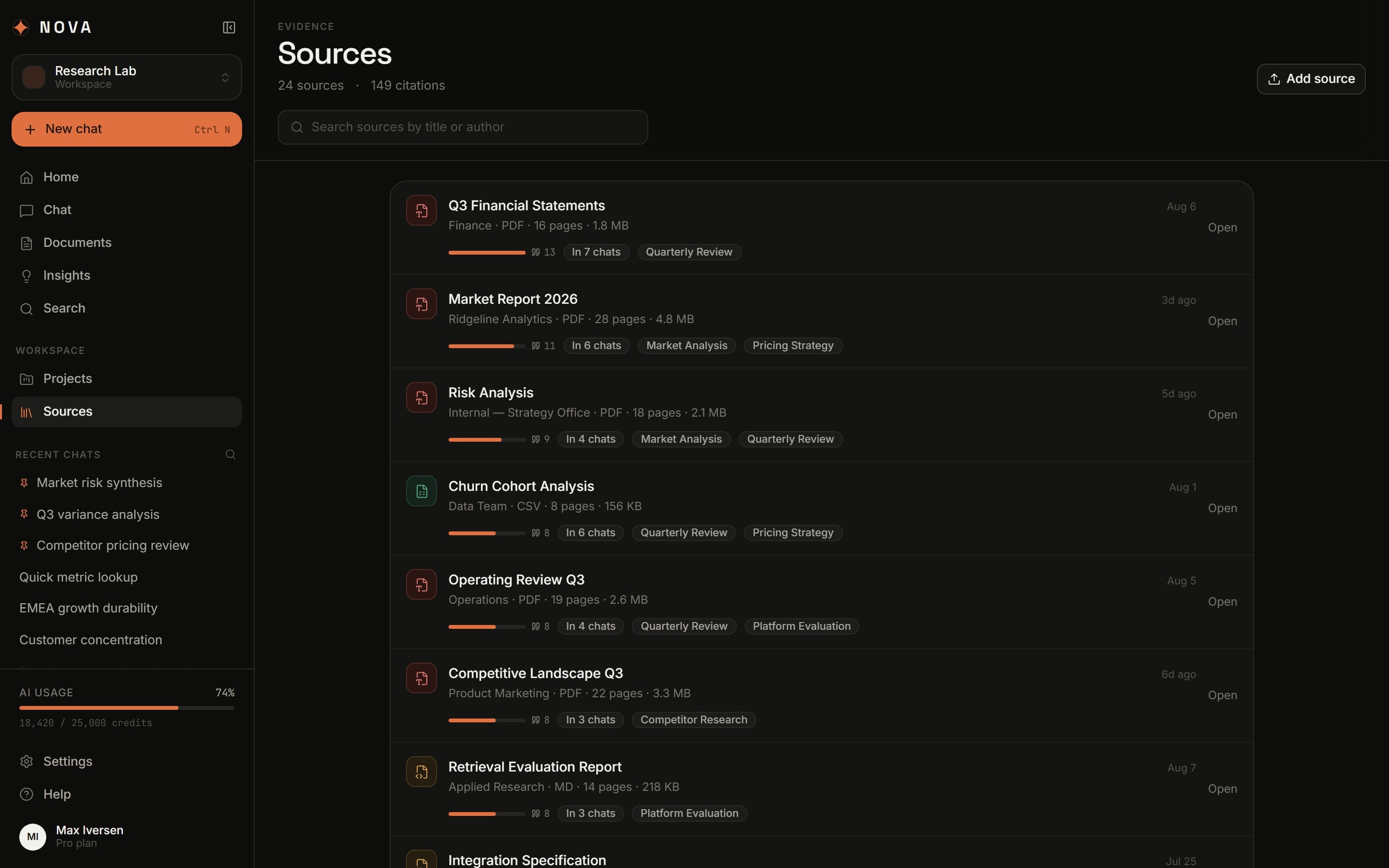
Seven surfaces in one workspace and 149 citations across 24 sources — no answer you cannot open and check.
- SaaS
- Product UI
- AI
- Design system
- Industry
- AI & research
- Engagement
- Ongoing
- Team
- 1 designer · 1 engineer
- Platforms
- Web app · Chat · Document library · Workspace search
01
Challenge
An assistant that answers confidently without showing where the answer came from is useless for research. You cannot quote it in a report, you cannot check it, and six months later you will not remember whether it was in a document or the model decided it.
NOVA had to be a place of work rather than a chat with files attached: documents go in, questions get asked, and what comes out stays — as a saved insight, as a project with open questions, as a source carrying a count of how often it has been leaned on.
- Corpus
- 24 documents · 421 pages · 37 MB
- Surfaces
- 7
- Hard part
- The answer has to be checkable, not persuasive
02
Solution
The citation became the unit of the interface. 149 references across 24 sources get a surface of their own: every source shows how many times it has been cited and in which conversations. “What is this based on” is a screen, not a search through chat history.
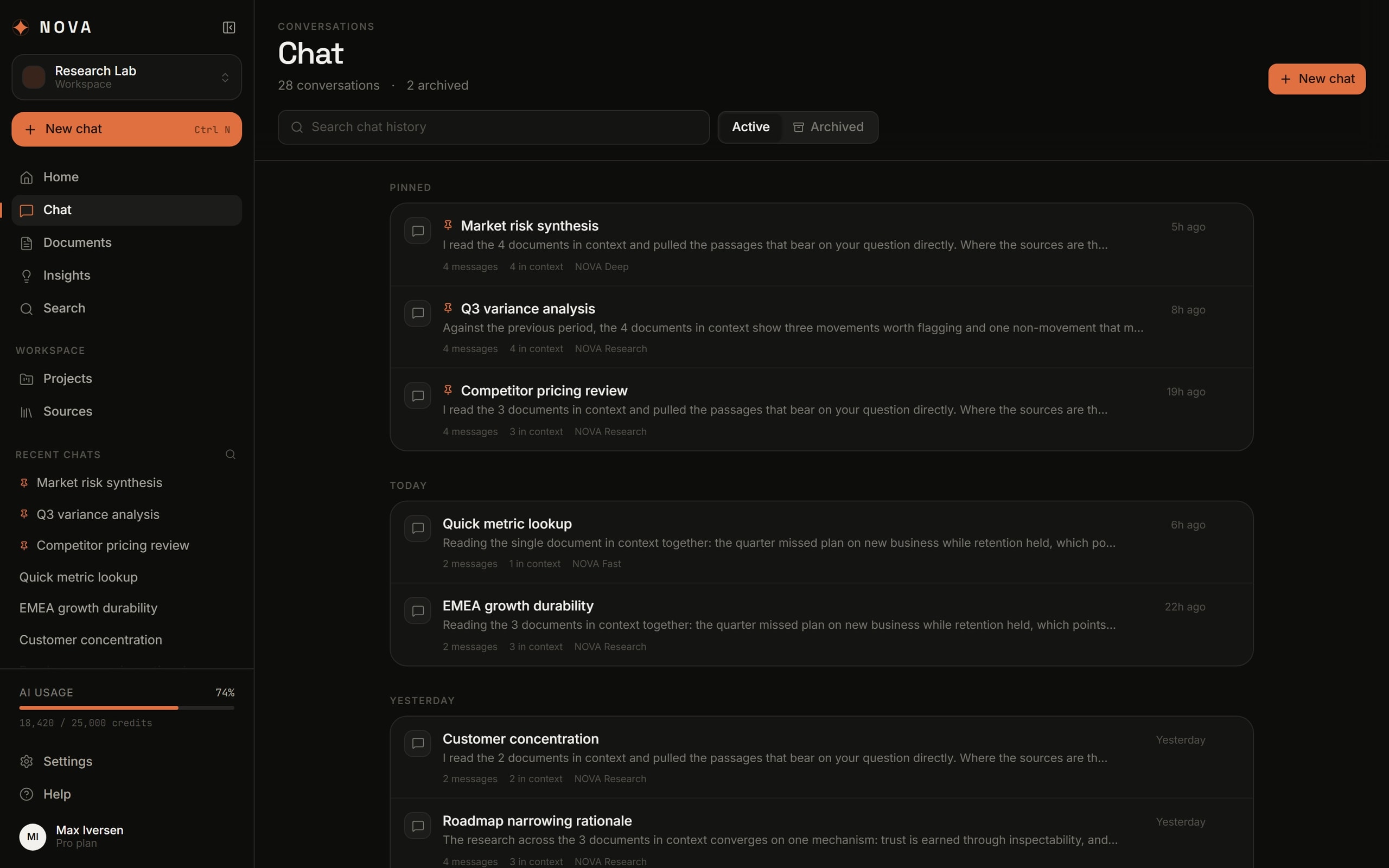
The chat shows what it actually read: “4 in context” sits beside the answer — not a metaphor, the number of documents that went in. The model budget is in plain sight too, in the sidebar: 18,420 of 25,000 credits. A product that spends money per call should not hide the meter.
03
Architecture
- L0WorkspaceClient
- L1ChatServiceLibraryServiceSearchService
- L2Context assemblyServiceDocument indexData
- L3CitationsDataModelExternal
Connections (10)
- Workspace → Chat
- Workspace → Library
- Workspace → Search
- Chat → Context assembly
- Library → Document index
- Search → Document index
- Context assembly → Document index
- Context assembly → Model
- Model → Citations
- Citations → Chat
04
UX
Research does not fit in one list, so the workspace is split into seven surfaces: a home for what has been happening, chat, library, insights, search, projects and sources. Each answers a different question — what do I already know, what did I ask, what is it standing on.
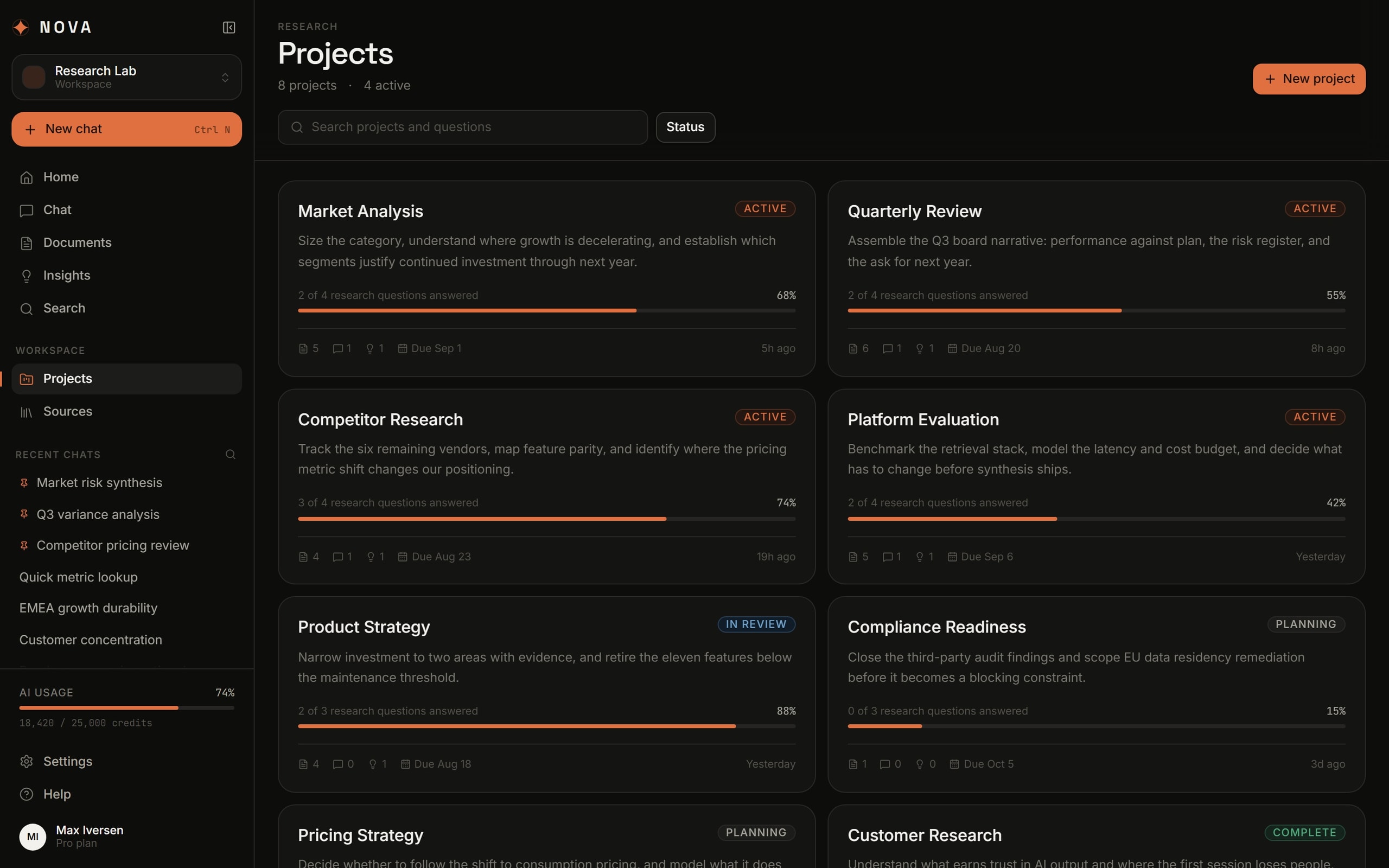
A project here is a set of open questions rather than a folder: “2 of 4 research questions answered” sits on the card. That framing is what stops research turning into an archive of conversations with nothing finished.
- Search
- Ctrl K — documents, chats, insights, projects
- New chat
- Ctrl N
- Projects
- 8, four of them active
05
UI
A dark surface and one warm accent. Orange marks exactly what starts work — “New chat” and the active section; everything else lives on greys, so an hour inside it does not tire the eye.
Density is set for reading: document and source rows carry format, size, page count and date on one line, with none of the air a card grid would demand. This is somewhere a shift gets worked, not a showroom.
06
Build
All seven surfaces are assembled from one component library: the list row, the metadata card, the counter, the tag filter and the detail panel repeat everywhere. Adding an eighth surface is assembly, not another screen drawn from scratch.
The states usually left until last are in from the start: an empty library, pinned conversations, the archive, a document still processing, and the credit budget run out.
07
What it does
Sources with counts
24 sources, 149 citations: each one shows how often it is cited and where.
Context in the open
The number of documents that actually went into context sits beside the answer.
Projects as questions
Research runs as a list of questions with answered/open state, not a folder of files.
Search across everything
Ctrl K searches documents, conversations, insights and projects at once.
Saved insights
31 findings with tags — what is left once a conversation is closed.
A visible budget
Model credit usage is in the sidebar, not buried in billing.
08
Integrations & stack
Integrations
- DOCX
- CSV
- Markdown
- Web pages
Frontend
- Next.js
- React
- TypeScript
- Tailwind CSS
AI
- Retrieval
- Citations
- Context assembly
Product
- Design system
- Keyboard shortcuts
- Workspace search
09
Where it landed
- 7
- Workspace surfaces
- 149
- Citations across 24 sources
- 421 pages
- Indexed
- In plain sight
- Model budget
Home · chat · documents · insights · search · projects · sources
Every one opens the page it came from
24 files, 37 MB
18,420 / 25,000 credits in the sidebar
An AI workspace you can argue with: any statement is one click from the page that produced it — which is the whole difference between a research tool and a persuasive chat.
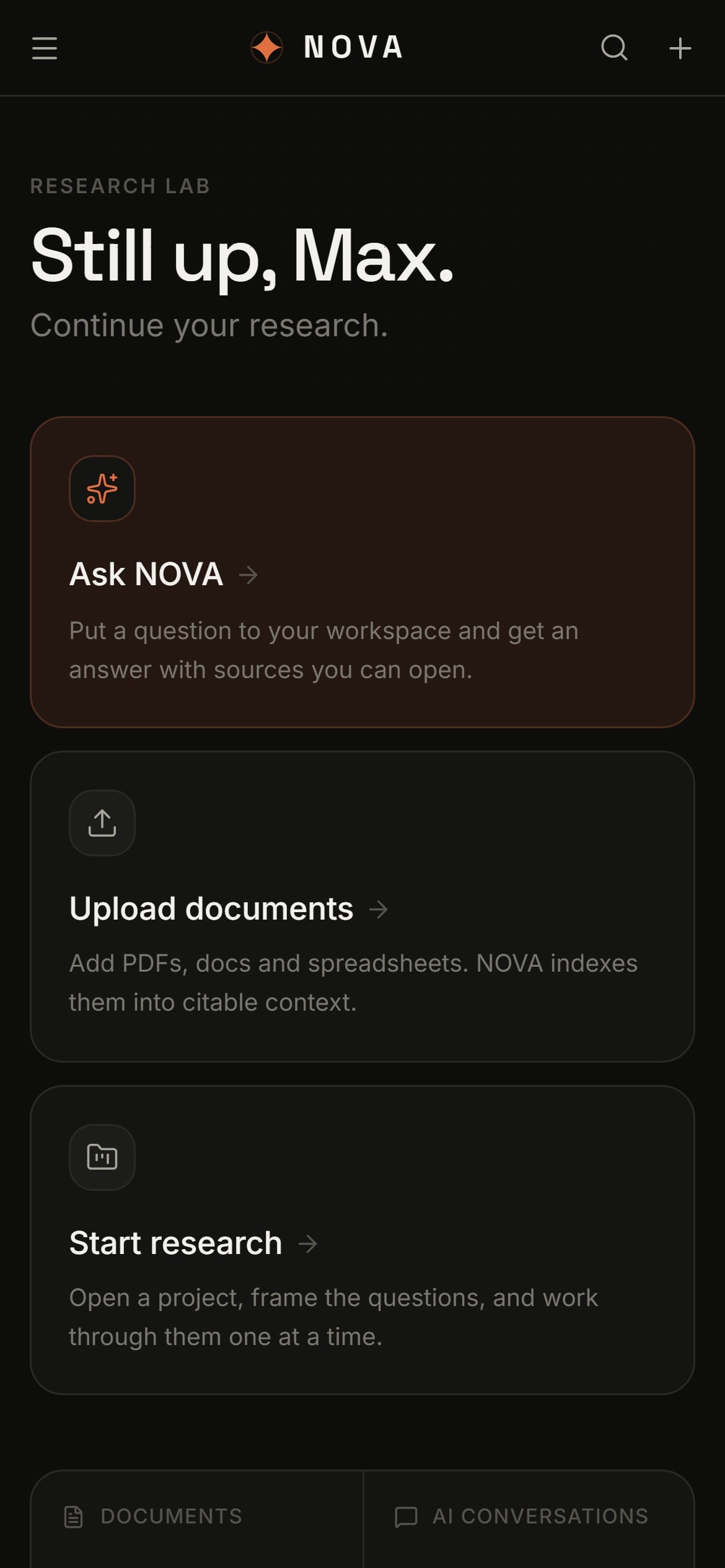
Every build is designed for the phone as its own experience, not as a narrowed desktop layout.
Got a product that should exist by now?Tell us about it.
Describe what has to change in your business. We will work out what that actually takes — including when it takes less than you think.