Workflow automation2026EN
FLOW
Twelve automations, 4,177 executions in thirty days, and a run you can watch travel the canvas node by node — including the one that fails.
- SaaS
- Product UI
- Builder canvas
- Design system
- Industry
- Workflow automation
- Engagement
- Ongoing
- Team
- 1 designer · 2 engineers
- Platforms
- Web application · Builder canvas · Run inspector · Template library
01
Challenge
Automation tools sell the canvas and hide the aftermath. Dragging three nodes into a happy path is the easy demo; the product is judged on the Tuesday a run dies at step 6 of 8 because a payload changed shape overnight, and the interface answers with a red dot.
FLOW had to carry the whole lifecycle instead: build it, validate it, test it against a real payload, publish it as a version, then live with what it costs and what it breaks. That is eight sections plus a builder and a run inspector, and every one of them reads the same execution data — which is exactly where this class of tool starts contradicting itself.
- Workspace
- 12 workflows · 8 published · 2 paused
- Volume
- 4,177 executions in 30 days
- Core difficulty
- The failure needs as much design as the happy path
02
Solution
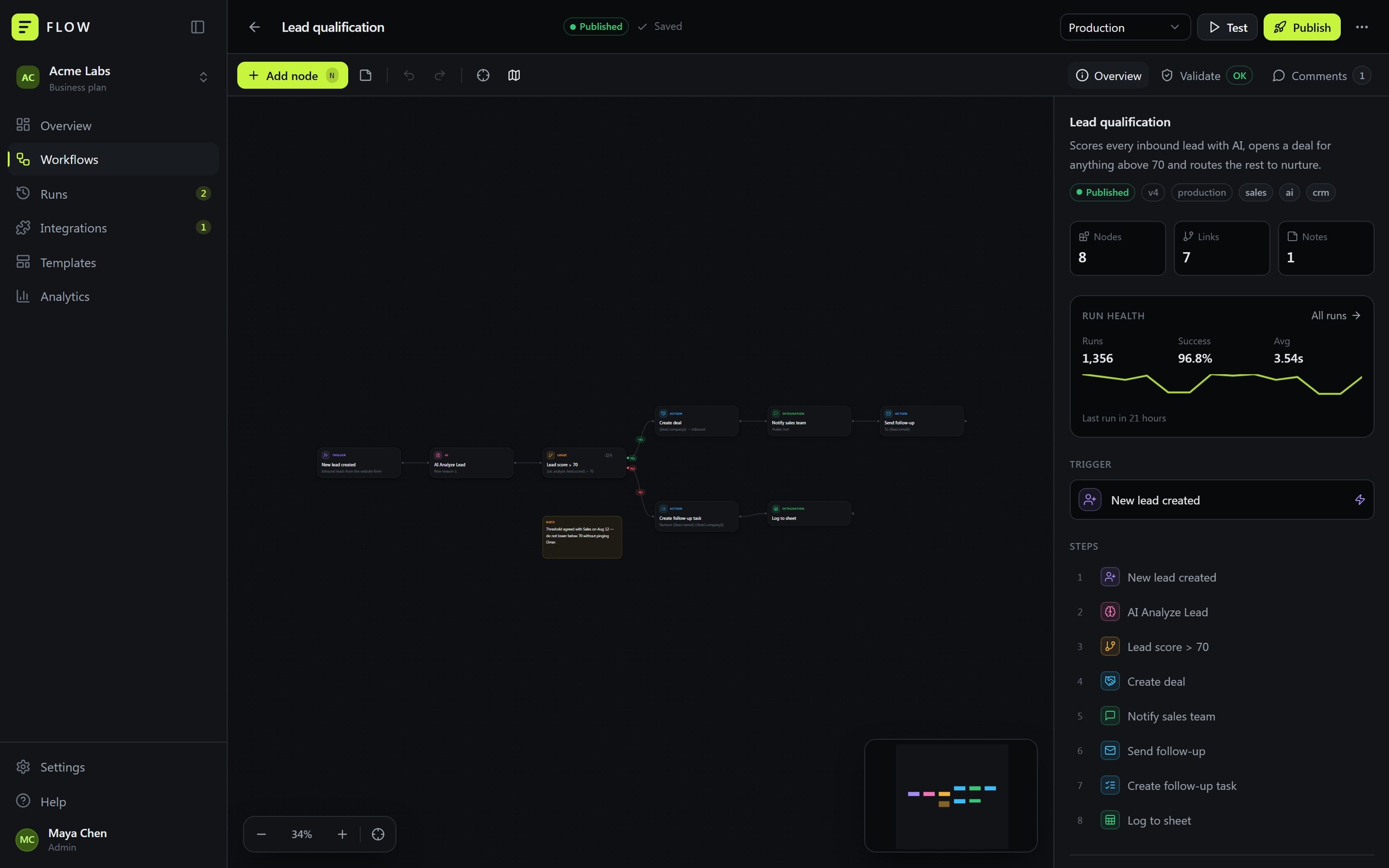
The canvas carries the whole vocabulary: 38 node types across six categories — triggers, actions, logic, AI, integrations, utilities — with the category on the node itself, so the shape of an automation is readable before a word of it is.
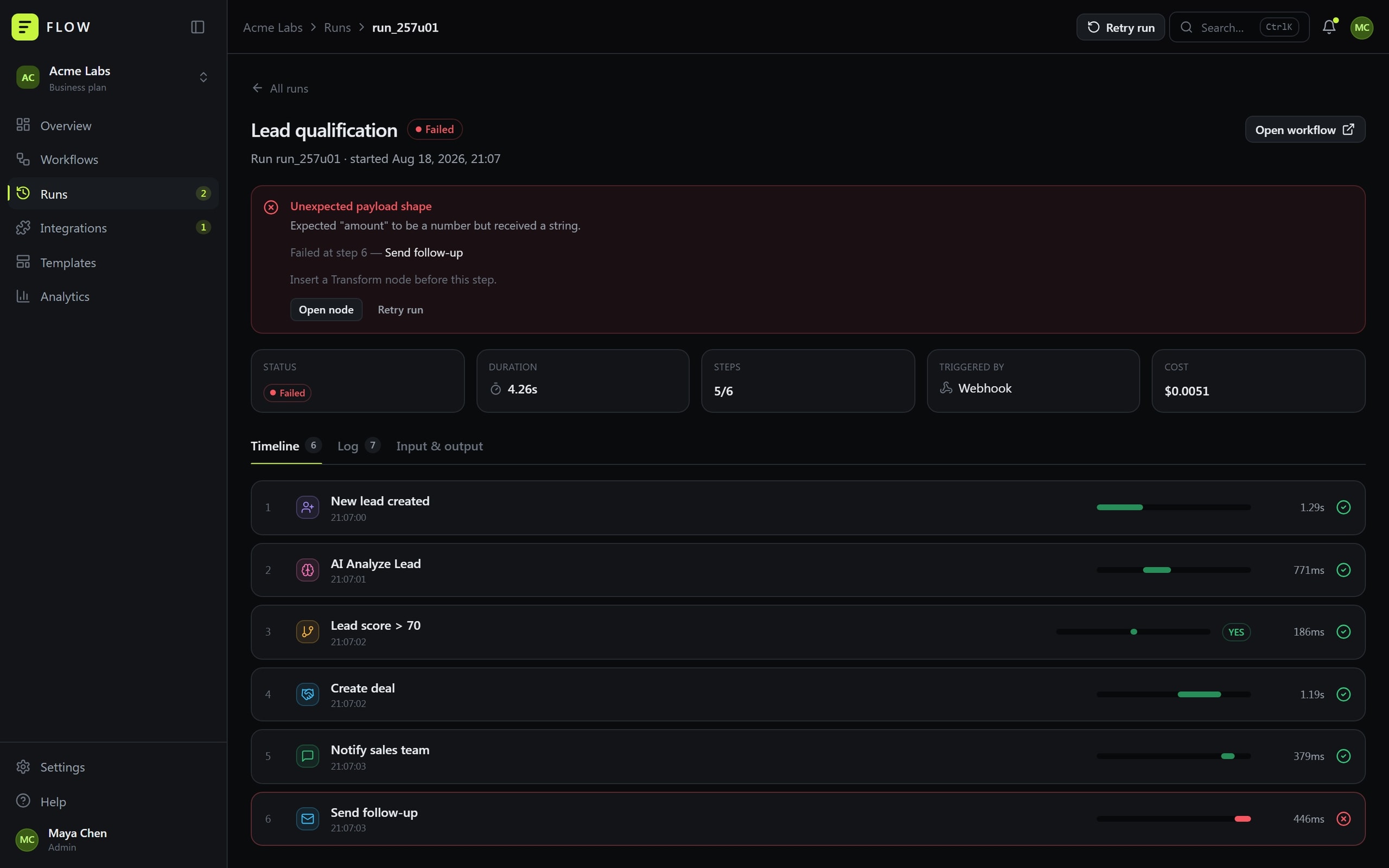
A run is not a status light. Every execution keeps its timeline, its log and its input and output per step, so a failure opens as a sentence: failed at step 6, Send follow-up, expected “amount” to be a number but received a string — insert a Transform node before this step. The fix is named on the screen where the break appears.
Publishing is a versioned event with validation in front of it. Environments are separate, published workflows can be paused, restored or rolled back, and a test runs against a JSON payload you supply while the canvas animates the execution node by node.
- Vocabulary
- 38 node types, six categories
- Diagnosis
- Timeline, log and per-step input/output
- Publishing
- Validated, versioned, reversible
03
Architecture
- L0Vite + React shellCode-split routes
- L1Eight sectionsOverview → settingsBuilder canvasReact Flow
- L2ValidationRuns before publishExecution engineWalks the graph
- L3Service layerShaped like an API client
- L4Workspace storeWorkflows, runs, commentsIntegration catalogue10 services, mock OAuthAI nodesAnalyze · classify · extract
- L5localStorageLocal-first
Connections (11)
- Vite + React shell → Eight sections
- Vite + React shell → Builder canvas
- Builder canvas → Validation · before publish
- Builder canvas → Execution engine · test run
- Eight sections → Service layer
- Validation → Service layer
- Execution engine → Service layer
- Execution engine → AI nodes
- Execution engine → Integration catalogue
- Service layer → Workspace store
- Workspace store → localStorage · persist
04
UX
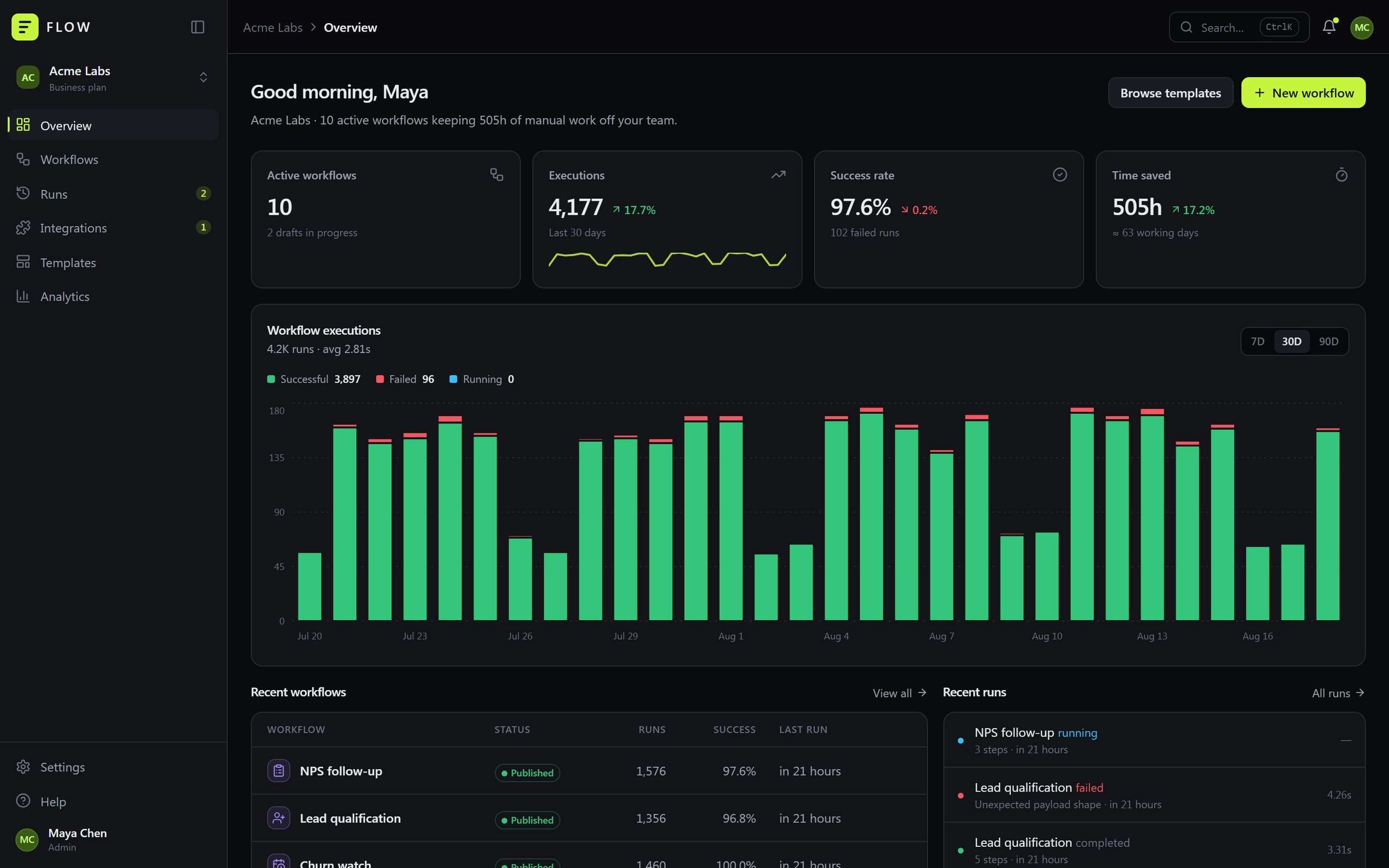
The workspace opens on the sentence an operations lead actually wants — 10 active workflows keeping 505h of manual work off your team — with executions, success rate and time saved beside it as trends rather than decoration.
This is a tool people sit inside all day, so depth is keyboard-first: Ctrl K opens the palette from anywhere, N adds a node, R tests the open workflow, F fits the graph. Nothing that matters needs a mouse to reach.
Breakage is surfaced where it gets fixed. Integrations lead with the one that needs attention — Stripe, the API key was rotated on Aug 15 — and Reconnect sits on the card, instead of leaving it to be discovered by the run that dies.
- Entry
- What is running and what it saved
- Keyboard
- Ctrl K · N · R · F · Ctrl S
- Breakage
- Surfaced where it is fixed
05
UI
Instrument surfaces in near-monochrome with a single acid-lime accent that marks the primary action and the live state and nothing else. Every state the product has to report — success, failure, running, paused, cancelled — carries a label, so colour is never the only thing saying it.
The six node categories get hues of their own on the canvas and nowhere else, which is the one place six colours earn their keep. Light and dark are both designed, chart series included.
06
Build
It runs entirely in the browser. Workflows, runs, integrations and comments live in localStorage behind a service layer shaped like an API client, so swapping the mock for a backend is a change of one function rather than of the interface.
The execution engine, the validator and the analytics are real implementations over that data: a test walks the graph, resolves {{lead.email}} variables against the payload, branches at the condition nodes and emits a log with duration and cost per node.
The canvas is React Flow with custom nodes, edges, notes and a minimap; routes are code-split, so the weight of the builder is not paid by someone who only came to read a run.
07
What it does
Builder canvas
38 node types across six categories on one canvas, with snap-to-grid, minimap, notes and autosave.
Test before publish
Runs against a JSON payload while the canvas animates the execution node by node, at three speeds.
Validation and versions
Validation runs before publishing; published workflows are versioned and can be paused, restored or rolled back.
Run inspector
Timeline, full log and input/output per step, with duration and cost carried on the run.
Failure diagnosis
A failed run names the step, the reason and the fix, and links straight to the node that broke.
Variables
Reference any upstream value with {{lead.email}} syntax; the picker shows exactly what exists at that step.
Integrations
Ten services with mock OAuth, per-service actions, and a card that says when credentials expired.
Templates and analytics
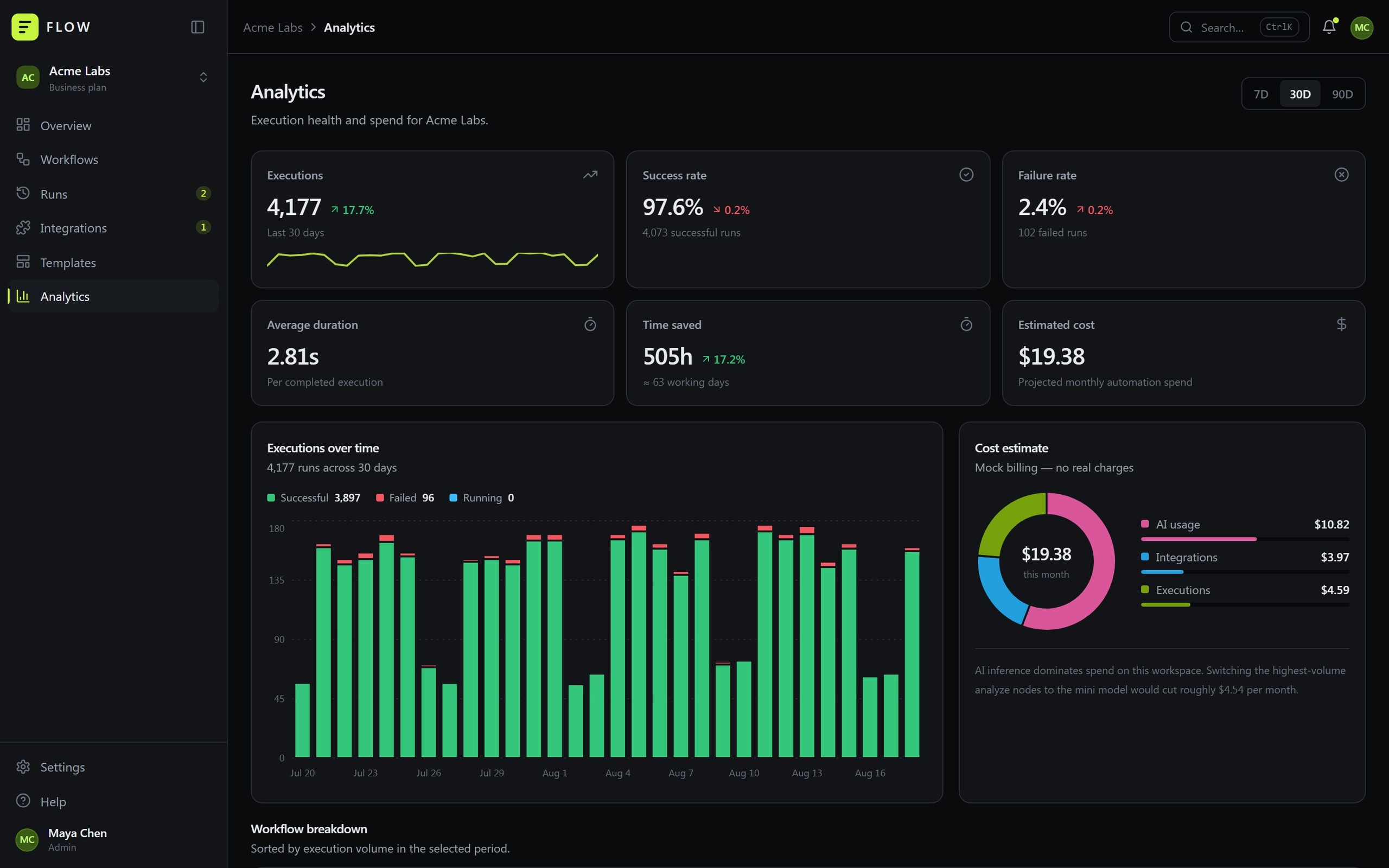
20 forkable workflows with usage and setup time, and a spend split across AI, integrations and executions.
08
Integrations & stack
Integrations
- Slack
- Telegram
- Gmail
- Notion
- Google Sheets
- Stripe
- HubSpot
- OpenAI
- Discord
- Webhooks
Frontend
- React
- TypeScript
- Vite
- Tailwind CSS
Canvas & charts
- React Flow
- Recharts
- Framer Motion
Product
- Execution engine
- Validation
- Local-first service layer
09
Where it landed
- 38
- Node types
- 4,177
- Executions in 30 days
- 505h
- Manual work removed
- Local-first
- State
Triggers · actions · logic · AI · integrations · utilities
97.6% success, 2.81s average
≈ 63 working days
localStorage behind an API-shaped service layer
An automation tool that shows its failures as clearly as its successes: every run keeps the log, the payload and the cost that produced it, and the fix is named on the screen where the break appears.
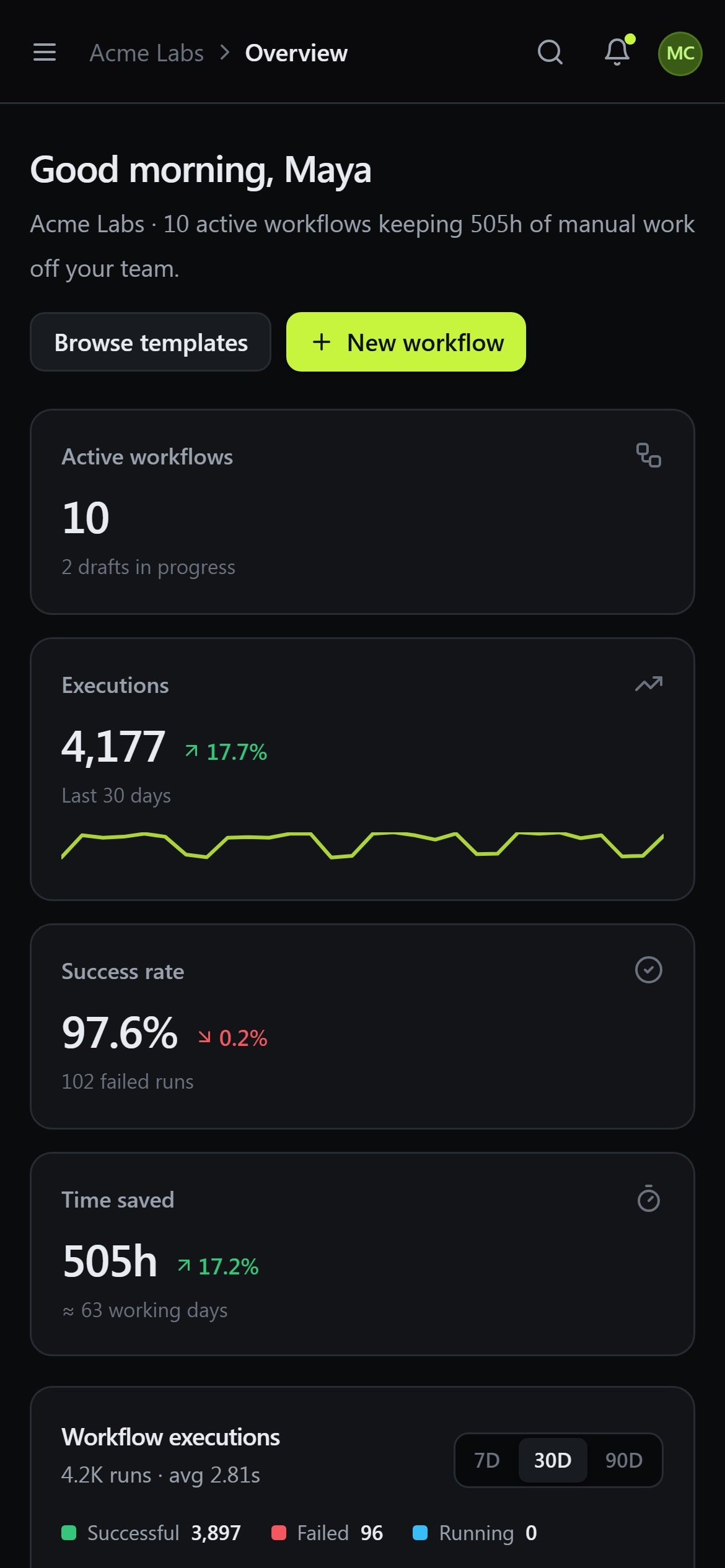
Every build is designed for the phone as its own experience, not as a narrowed desktop layout.
Got a product that should exist by now?Tell us about it.
Describe what has to change in your business. We will work out what that actually takes — including when it takes less than you think.